> ## Documentation Index
> Fetch the complete documentation index at: https://docs.finta.io/llms.txt
> Use this file to discover all available pages before exploring further.
# Plaid Says You Have No Accounts
> What to do when Plaid can't find accounts to connect. Exit Plaid, start over, and select fewer data types — or use Finta's one-click retry.
When you connect a bank through Plaid, Finta first asks which types of data you want — **Transactions**, **Investments**, and/or **Liabilities**. Plaid then only connects accounts that support **every** data type you picked. If none of your accounts match all of them, you'll see a "no accounts" error.
The fix is almost always the same: **try again with fewer data types.** The error shows up in one of two places, so here's how to recognize each and exactly what to do.
## 1. If Plaid shows "No eligible accounts"
Most often, the error appears **inside the Plaid window** — a screen with a red ✕, the heading **"No eligible accounts,"** and a black **Return** button. This is Plaid's own screen, so Finta can't add a retry button to it. You need to exit and start over.
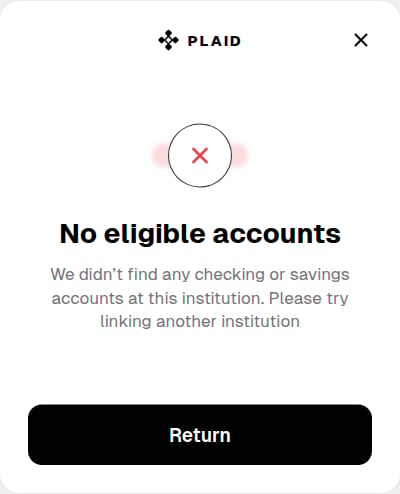 The exact wording can vary (for example, "We didn't find any checking or savings accounts at this institution"). Any "no eligible accounts" message from Plaid is handled the same way.
**What to do:**
Tap **Return** (or the **✕** in the top corner) to exit Plaid and go back to Finta.
On the **Accounts** page, click **Add Bank Connection** again and search for and select the same institution.
On the **"What data do you want?"** step, check **only** the data type that matches the account you're connecting — ideally just one:
* **Investments** for a brokerage or retirement account
* **Transactions** for a checking, savings, or credit card account
* **Liabilities** for a loan or credit account
The exact wording can vary (for example, "We didn't find any checking or savings accounts at this institution"). Any "no eligible accounts" message from Plaid is handled the same way.
**What to do:**
Tap **Return** (or the **✕** in the top corner) to exit Plaid and go back to Finta.
On the **Accounts** page, click **Add Bank Connection** again and search for and select the same institution.
On the **"What data do you want?"** step, check **only** the data type that matches the account you're connecting — ideally just one:
* **Investments** for a brokerage or retirement account
* **Transactions** for a checking, savings, or credit card account
* **Liabilities** for a loan or credit account
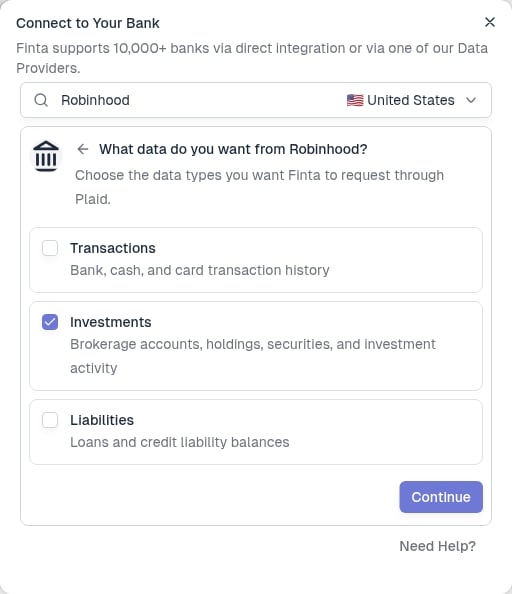 Click **Continue** and finish connecting in Plaid. With a narrower request, your matching accounts should now appear.
## 2. If Finta shows "No matching accounts found"
Sometimes Plaid hands the error back to Finta instead of showing its own screen. In that case, Finta shows a notification — **"No matching accounts found"** — with a button to retry automatically:
> **No matching accounts found**
> We couldn't find active accounts at your bank that match Transactions and Investments. Try a smaller data request.
>
> **Try Investments only →**
**What to do:** Click the retry button — for example, **"Try Investments only"** (Finta fills in the specific data type). Finta reopens Plaid with just that one data type, so there's no need to start over manually. If you originally selected more than two types, Finta offers a separate retry option for each one.
## Why this happens
Plaid only shows accounts that support **all** of the data types you requested, so an account has to match every one of them to appear. Ask for more types than your account supports, and Plaid returns nothing.
This is most common at **brokerages** like Robinhood, Schwab, Fidelity, or Vanguard. If you select both **Transactions** and **Investments** but your account only holds investments, no account supports transactions — so Plaid reports no accounts, even though your investment data would connect fine on its own.
When in doubt, connect **one data type at a time**. You can always add another connection for the same institution later if you need more than one type of data.
## Still seeing the error?
If you selected **only one data type** and still get a "no accounts" error, Plaid couldn't find any account at that institution that supports the data you asked for. This can happen if the account is brand new, isn't fully set up at the institution yet, or isn't supported by Plaid for that data type.
At this point, please [contact support](mailto:hello@finta.io). It helps to mention the institution name and which data type you selected — Finta logs the details of each connection attempt, so support can trace exactly what Plaid returned and help from there.
## Related
Walk through connecting a bank and choosing data types
Re-authenticate, add accounts, and troubleshoot existing connections
Click **Continue** and finish connecting in Plaid. With a narrower request, your matching accounts should now appear.
## 2. If Finta shows "No matching accounts found"
Sometimes Plaid hands the error back to Finta instead of showing its own screen. In that case, Finta shows a notification — **"No matching accounts found"** — with a button to retry automatically:
> **No matching accounts found**
> We couldn't find active accounts at your bank that match Transactions and Investments. Try a smaller data request.
>
> **Try Investments only →**
**What to do:** Click the retry button — for example, **"Try Investments only"** (Finta fills in the specific data type). Finta reopens Plaid with just that one data type, so there's no need to start over manually. If you originally selected more than two types, Finta offers a separate retry option for each one.
## Why this happens
Plaid only shows accounts that support **all** of the data types you requested, so an account has to match every one of them to appear. Ask for more types than your account supports, and Plaid returns nothing.
This is most common at **brokerages** like Robinhood, Schwab, Fidelity, or Vanguard. If you select both **Transactions** and **Investments** but your account only holds investments, no account supports transactions — so Plaid reports no accounts, even though your investment data would connect fine on its own.
When in doubt, connect **one data type at a time**. You can always add another connection for the same institution later if you need more than one type of data.
## Still seeing the error?
If you selected **only one data type** and still get a "no accounts" error, Plaid couldn't find any account at that institution that supports the data you asked for. This can happen if the account is brand new, isn't fully set up at the institution yet, or isn't supported by Plaid for that data type.
At this point, please [contact support](mailto:hello@finta.io). It helps to mention the institution name and which data type you selected — Finta logs the details of each connection attempt, so support can trace exactly what Plaid returned and help from there.
## Related
Walk through connecting a bank and choosing data types
Re-authenticate, add accounts, and troubleshoot existing connections